Fashion Figure II Brushes for Procreate: A Game-Changer for Digital Fashion Designers
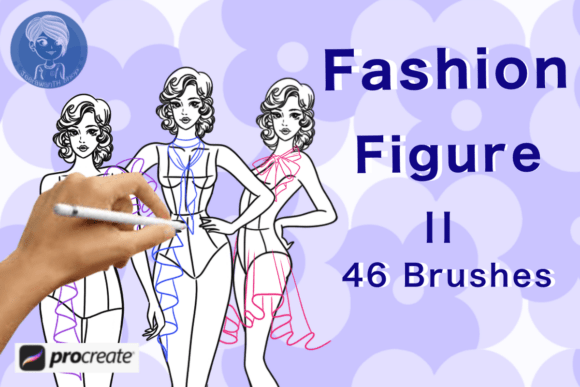
Creating fashion designs used to mean hours of sketching, redrawing, and refining. With the right tools, that process can now be faster, more intuitive, and accessible to everyone from students to seasoned professionals. Enter Fashion Figure II Brushes for Procreate — a powerful brush set designed specifically for digital fashion illustration. Whether you're building a portfolio, sketching a new collection, or experimenting with outfit ideas, this set of 46 unique poses can dramatically streamline your workflow.
What Are Fashion Figure II Brushes for Procreate?
Fashion Figure II Brushes for Procreate is a digital brush pack created for iPad users who work with the Procreate app. It includes 46 ready-to-use fashion figure stamp brushes, each offering a different pose or body position. These brushes allow designers to instantly place high-quality fashion figure outlines onto their canvas with a single tap. The result? A clean, professional base for sketching clothing, accessories, and textures — without the need to draw from scratch.
Each brush is thoughtfully designed to reflect a variety of fashion-forward stances, giving users flexibility in how they present their designs. From casual poses to dramatic runway-ready positions, this set supports a wide range of creative directions.
Why Fashion Designers Are Turning to Digital Tools
As fashion becomes more digital, so do the tools used to create it. Many designers now rely on tablets and styluses to bring their ideas to life. Procreate, in particular, has become a go-to platform due to its intuitive interface, robust feature set, and support for custom brushes like Fashion Figure II.
Using digital brushes like these allows for greater flexibility. You can easily resize, rotate, and layer figures to test different outfit combinations or layout designs. Plus, digital tools eliminate the need for physical materials, making the design process more sustainable and cost-effective.
How Fashion Figure II Brushes Save Time and Boost Creativity
One of the biggest advantages of Fashion Figure II Brushes is how much time they save. Traditional fashion sketching often starts with drawing a figure from scratch — a process that can take minutes or even hours, depending on the level of detail. With these brushes, you simply tap once to place a perfectly proportioned figure on your canvas.
- Instant figure placement – No need to redraw bodies for each new design.
- Customizable base – Easily adjust size, color, and layers to fit your design vision.
- Focus on clothing – Spend more time designing outfits and less on figure anatomy.
This time-saving benefit is especially valuable for fashion students or freelancers who need to produce multiple sketches quickly. It also helps professionals iterate faster, allowing them to explore more design options in less time.
Designed for All Skill Levels
Whether you're a beginner just learning the ropes of fashion illustration or a pro working on a client project, Fashion Figure II Brushes for Procreate are built to be user-friendly. The brushes are compatible with Procreate’s intuitive interface, making them easy to install and use right away.
For new designers, the brushes act as a guide, helping them understand proportion and pose without the pressure of drawing from memory. For experienced users, they offer a way to speed up the design process and maintain consistency across multiple sketches.
There’s no steep learning curve involved — just tap, drag, and start designing.
Real-World Applications of Fashion Figure II Brushes
These brushes aren’t just for sketching clothes. They can be used in a variety of real-world design scenarios, including:
- Fashion portfolios – Quickly build a cohesive collection of designs with consistent figures.
- Client presentations – Show outfits on professional-looking figures to convey your vision clearly.
- Online content creation – Create fashion sketches for social media, tutorials, or blogs in minutes.
- School projects – Meet tight deadlines with pre-drawn figures that help you focus on the design itself.
Because the brushes are digital, you can also export your designs in high resolution for print or digital use, making them ideal for both personal and professional applications.
Exploring the 46 Unique Poses
One of the standout features of Fashion Figure II Brushes is the variety of poses available. These aren’t generic stick figures — each pose is stylized to reflect modern fashion illustration trends. Whether you're designing streetwear, haute couture, or costume pieces, there’s a figure that matches your vision.
Some of the most popular poses include:
- Front view with hands on hips
- Side profile with dynamic leg movement
- Runway-ready turn with dramatic flair
- Casual standing pose for everyday wear
- Seated and cross-legged positions for relaxed designs
This variety ensures that your designs are presented in a way that feels dynamic and authentic. You’re not limited to one body type or stance — you can mix and match poses to suit your creative needs.
How to Get the Most Out of Fashion Figure II Brushes
To make the most of this brush set, consider the following tips:
- Use layers effectively – Place the figure on one layer and your clothing design on another for easy editing.
- Experiment with scale – Resize figures to create group layouts or focus on specific outfits.
- Combine with other brushes – Use texture brushes or fabric brushes alongside Fashion Figure II for more detailed designs.
- Save your favorite poses – Organize your most-used brushes for quick access during fast-paced design sessions.
By integrating these brushes into your regular workflow, you’ll find that your design sessions become more productive and enjoyable.
Compatibility and Setup
Fashion Figure II Brushes for Procreate are designed to work seamlessly with the Procreate app on iPad. Installation is straightforward: download the brush file, open it in Procreate, and the brushes will be added to your brush library. There’s no need for complex settings or adjustments — just tap and go.
They work across different versions of Procreate and are compatible with Apple Pencil, making them a versatile addition to any digital designer’s toolkit.
Who Should Use Fashion Figure II Brushes?
This brush set is ideal for:
- Fashion designers – Speed up your design process and maintain consistency across collections.
- Illustrators – Add fashion figures to your artwork without spending time on anatomy.
- Fashion students – Learn garment placement and design with professional-grade tools.
- Content creators – Make fashion-related digital content faster and more visually appealing.
Whether you're designing for a brand, a portfolio, or personal projects, Fashion Figure II Brushes offer a practical way to elevate your work without reinventing the wheel.
Final Thoughts
In a world where time and efficiency matter, tools like Fashion Figure II Brushes for Procreate are invaluable. They offer a smart, scalable way to bring fashion ideas to life — no matter your skill level or design style. With 46 unique poses, seamless integration with Procreate, and an intuitive design, this brush set is more than just a shortcut — it’s a creative enabler.
If you're ready to take your fashion design process to the next level, consider adding Fashion Figure II Brushes to your toolkit. You might just find that your next big idea comes together faster than you ever imagined.