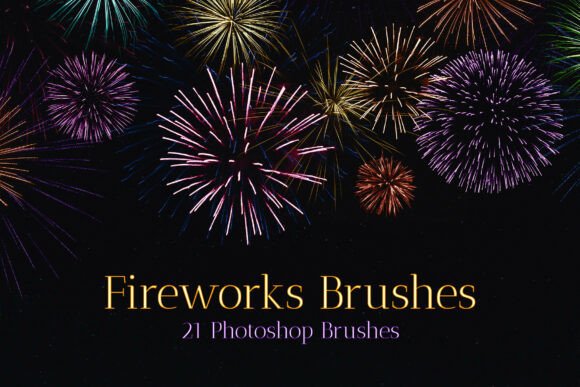
Fireworks Stamps Photoshop Brushes: Add Instant Celebration to Your Designs
Designing for a celebration can be exciting, but it’s not always easy to capture that vibrant, energetic feeling in your visuals. That’s where Fireworks Stamps Photoshop Brushes come in. This collection of 21 high-quality brushes is crafted to bring the dynamic energy of real fireworks, glitter explosions, and festival lights directly into your digital projects. Whether you're creating a poster, a social media graphic, or a wedding invitation, these brushes make it simple to infuse your work with a sense of joy and motion.
What Makes Fireworks Stamps Photoshop Brushes Unique
These brushes aren’t just sparkles and smoke. Each one is a detailed, high-resolution stamp that mimics the organic, unpredictable beauty of real fireworks. From soft bursts of light to intense, crackling spark trails, the set offers a variety of styles that feel both spontaneous and intentional. The textures are crisp, the edges are clean, and the overall effect is one of celebration and movement.
Designed with both subtlety and impact in mind, the brushes work well across a range of design styles — from editorial and branding to digital art and event graphics. The visual personality is bold yet versatile, making it easy to integrate into both bright and dark-themed projects. These are not just decorative elements; they’re tools that help you communicate energy, excitement, and festivity with just a few brushstrokes.
Where These Photoshop Brushes Shine
One of the standout features of Fireworks Stamps Photoshop Brushes is their adaptability. You’ll find them especially useful in:
- Event posters – Concerts, festivals, and holiday parties come alive with a touch of light and motion.
- Social media content – Stand out in crowded feeds with eye-catching visuals that feel dynamic and timely.
- Wedding and event invitations – Add a touch of sparkle without overdoing it.
- Digital art and photo overlays – Enhance portraits or illustrations with realistic light effects.
- Marketing and branding visuals – Use them to highlight promotions, launches, or celebratory campaigns.
These brushes are also ideal for digital scrapbooking, blog graphics, and even packaging mockups. Whether you're a professional designer or a hobbyist, this set gives you the flexibility to enhance your visuals without needing advanced skills in special effects or lighting simulation.
How to Use These Brushes Effectively
While the brushes are easy to install and apply, getting the most out of them requires a bit of thoughtful application. Here are a few practical tips:
- Layer with intention – Don’t just drop a brush in and call it done. Experiment with blending modes like Screen or Overlay to create realistic light interactions.
- Adjust size and opacity – Smaller, subtler bursts can add depth, while larger, brighter ones serve as focal points.
- Combine with other textures – Pair these brushes with grunge textures or light leaks for a more complex, layered look.
- Use them as masks or overlays – Instead of painting directly on a layer, try clipping the brush effect to a gradient or photo for a more integrated result.
Also, remember that less is often more. A single, well-placed burst can be more effective than a cluttered, over-the-top explosion of effects.
Real-World Design Applications
Let’s look at a few examples of how you might use these brushes in actual projects:
- New Year’s Eve poster – Use a large burst as a background element behind text to create a dramatic, celebratory focal point.
- Music festival flyer – Layer smaller sparks around band names or dates to suggest energy and excitement.
- Instagram story for a product launch – Add a subtle glitter trail behind animated text to elevate the visual impact.
- Photo enhancement for a night portrait – Use a soft brush to simulate natural light reflections or add a touch of fantasy to a night scene.
These aren’t just decorative touches — they help guide the viewer’s eye, reinforce the mood, and make your visuals feel more immersive and engaging.
Choosing the Right Brush for Your Project
When working with a set like Fireworks Stamps Photoshop Brushes, it’s important to choose the right tool for the job. Not every brush will suit every design. Here’s how to pick the best ones:
- Consider the mood – Do you need something soft and elegant, or bold and dramatic? Some brushes have a more refined look, while others are chaotic and intense.
- Match the color palette – These brushes work best when color-corrected to fit your design. Use adjustment layers to tweak hue, saturation, and brightness for seamless integration.
- Test at different scales – Some brushes look great big, while others work best as small accents. Always preview at actual print or screen size.
- Check licensing – These brushes are typically available for both personal and commercial use, but always confirm the license terms before using them in client work or products.
Take the time to test each brush in context. A brush that looks amazing on its own might not work as well within your overall composition.
Final Thoughts
Fireworks Stamps Photoshop Brushes offer a powerful way to add instant celebration and visual interest to your designs. Whether you're working on digital illustrations, event graphics, or branding materials, this set gives you the tools to enhance your visuals with professional-grade effects. The key is to use them thoughtfully — integrating them into your designs in a way that supports your message, not overshadows it.
If you’re looking to elevate your next project with a touch of light, motion, and energy, this brush set is definitely worth exploring. With a little creativity and intention, you can turn ordinary visuals into something truly celebratory.