Frame Brushes 1: Enhancing Mixed Media Design with Precision and Flexibility
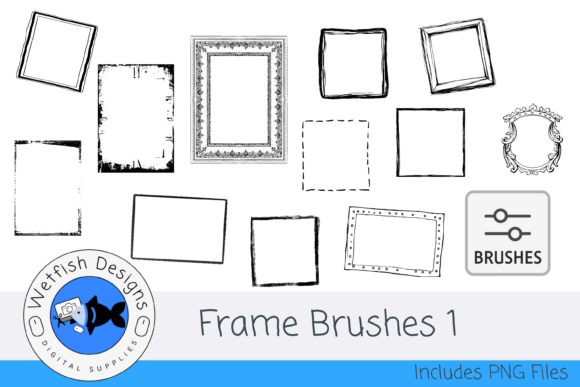
For digital designers and mixed media creators, finding tools that blend functionality with creative freedom is essential. Frame Brushes 1 offers a set of 12 dynamic Photoshop brushes that provide just that. These brushes are crafted to help artists, educators, marketers, and hobbyists elevate their visual storytelling through frames that add structure, texture, and depth to any project.
Each brush in the Frame Brushes 1 collection is designed with a specific purpose in mind. Whether you're working on collage art, junk journals, or digital scrapbooks, these brushes deliver a range of visual effects—from soft gradients to bold patterns—without compromising quality. The brushes are optimized for Adobe Photoshop, allowing for seamless integration into existing workflows. Simply drag and drop the .abr file into Photoshop, and you're ready to start creating.
Why Frame Brushes 1 Stands Out for Digital Artists
One of the most practical benefits of Frame Brushes 1 is its dual-format delivery. In addition to the Photoshop brushes, each frame is available as a standalone 300dpi PNG file on a transparent background. This flexibility allows users who don’t have Photoshop to still take advantage of the designs by importing the PNGs into other graphic design software or using them as digital stamps in printable projects.
For creators who frequently switch between design platforms or collaborate with others, this cross-compatibility ensures that the quality and intent of the design remain intact. It also gives educators and small business owners the ability to use these assets in a variety of formats, from classroom materials to branded content, without needing to invest in specific software.
Time-Saving Design Enhancements for Real Projects
In creative work, time is often as valuable as inspiration. Frame Brushes 1 helps streamline the design process by offering pre-built framing elements that can be applied instantly. Instead of manually drawing or layering borders and textures, users can apply a brush and adjust opacity, size, or color to fit their vision.
This efficiency is particularly useful for bloggers and content creators who need to maintain a consistent visual style across multiple platforms. A junk journal artist can use one of the bolder frame brushes to define a page layout, while a digital marketer can apply a softer gradient frame to highlight key sections of a social media graphic. In both cases, the result is a polished, professional look achieved in a fraction of the time.
Supporting Creativity Across Mixed Media Formats
The versatility of Frame Brushes 1 makes it a valuable resource for a wide range of creative applications. Whether you're assembling a digital collage or designing a layered decoupage piece, these brushes can help unify elements within a composition. They also serve as excellent tools for adding visual hierarchy—guiding the viewer’s eye through a design with subtle framing and texture.
For example, a freelance illustrator working on a children’s book layout might use one of the patterned frame brushes to enclose a character illustration, creating a storybook feel without overwhelming the page. Meanwhile, a scrapbook designer might layer multiple frames to create depth and dimension in a digital layout. These are just a few ways Frame Brushes 1 can be used to support creative expression across mediums.
Who Benefits Most from Frame Brushes 1?
Professionals and hobbyists alike can find value in this brush set. Educators may use the frames to create engaging handouts or digital presentations. Entrepreneurs and bloggers can incorporate them into branded graphics and visual content. Artists working in digital collage or mixed media can integrate the brushes to define focal points or separate design elements.
Even those who are relatively new to Photoshop will find Frame Brushes 1 easy to use. The intuitive nature of brush tools in Photoshop, combined with clear visual results, makes it accessible for beginners while still offering enough depth for advanced users. And for those who prefer not to use Photoshop, the included PNGs offer a straightforward alternative that maintains the integrity of the original designs.
Considerations for Best Use
While Frame Brushes 1 is a powerful tool, it’s important to consider how it fits into your current design workflow. If you primarily work in vector-based software or need scalable elements for print, you may want to pair these brushes with vector assets for optimal results. Additionally, while the brushes are optimized for Photoshop, users of other programs will need to rely on the PNG files, which may require additional steps to customize.
As with any design resource, the effectiveness of Frame Brushes 1 depends on how well it aligns with your creative goals and technical setup. It’s worth exploring a preview or sample if available, to ensure the brush styles and textures match your intended use before full implementation.
Maximizing the Value of Frame Brushes 1
To get the most out of Frame Brushes 1, consider experimenting with blending modes, layer effects, and color overlays in Photoshop. These adjustments can dramatically change the appearance of each frame, allowing you to adapt them to different themes or color schemes. You can also combine multiple brushes to create layered borders or use the PNGs as masks in other design programs for unique effects.
Another practical tip is to save custom brush presets if you find yourself frequently adjusting settings. This can help maintain consistency across projects and reduce repetitive steps. Whether you're designing a series of social media posts or assembling a digital portfolio, having a consistent visual language can make your work more cohesive and professional.
Conclusion: A Thoughtful Addition to Any Designer’s Toolkit
Frame Brushes 1 offers a practical and flexible solution for anyone looking to enhance their digital or mixed media projects with professional-grade framing elements. By combining ease of use with creative versatility, this brush set supports both efficiency and artistic expression. Whether you're a seasoned designer or just starting out, it’s a resource worth exploring to see how it can elevate your visual work.