Pencil Sketch Brushes for Photoshop
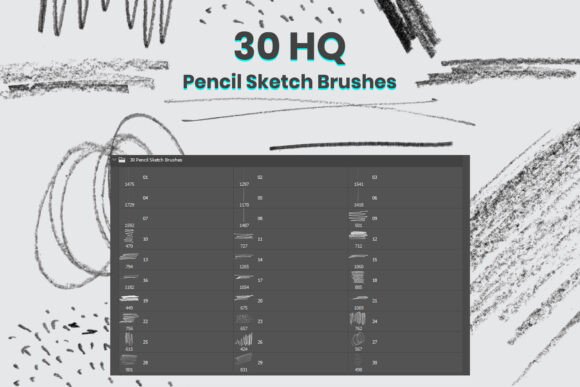
Creating digital art that feels hand-drawn and organic can be a challenge. That’s where the Pencil Sketch Brushes for PS come in. This set of 30 high-quality Photoshop brushes brings the authentic texture and nuance of real pencil strokes into your digital workflow. Whether you're sketching concepts, refining illustrations, or adding texture overlays, these brushes help you maintain a traditional feel while working in a modern digital environment.
What Makes These Brushes Unique
Unlike generic brush sets, the Pencil Sketch Brushes for PS are designed to mimic the subtleties of real graphite on paper. Each brush in the collection is crafted to replicate different pencil techniques—soft shading, hard lines, scribbles, crosshatching, and more. This variety allows artists to build depth and texture naturally, without relying on filters or effects that can look artificial.
They're also incredibly easy to use. Just drag and drop the ABR file into Photoshop and you’re ready to start drawing. Compatibility with Photoshop CS6 and all newer versions ensures that both seasoned professionals and hobbyists can integrate them seamlessly into their workflow.
Creative Possibilities with Pencil Sketch Brushes
These brushes open up a wide range of creative applications across different artistic disciplines. Here are a few ways to use them effectively:
- Concept Art: Use the rougher pencil brushes to quickly block in ideas and explore compositions. The tactile feel of the strokes helps keep your early sketches loose and expressive.
- Illustration: Layer the softer brushes under line work to add shading and dimension. This mimics traditional pencil illustration techniques and gives your work a grounded, hand-crafted look.
- Texture Overlays: Apply the scribble and crosshatch brushes over digital paintings or photo composites to introduce organic texture and visual interest.
- Storyboarding: For filmmakers and animators, these brushes help maintain a consistent sketch style across panels, supporting a cohesive narrative flow.
Adapting for Different Audiences and Formats
Whether you're a freelance illustrator, a graphic designer, or a content creator, the Pencil Sketch Brushes for PS offer flexibility across platforms and project types. Here's how different users can apply them:
- Bloggers & Marketers: Add hand-drawn annotations or visual flair to infographics and social media visuals. This gives your content a more approachable and human feel.
- Teachers & Educators: Use the brushes to create engaging visual lesson materials. Hand-drawn diagrams and sketches can help students better absorb complex ideas.
- Freelance Artists: Build a signature sketch style that clients recognize. Use the brushes to create thumbnails, character studies, or finished sketches that feel authentic.
- Small Business Owners: Design custom packaging, logos, or promotional materials with a hand-crafted aesthetic that stands out in a digital marketplace.
How to Get the Most from the Brushes
Getting great results with the Pencil Sketch Brushes for PS isn’t just about having the right tools—it’s about knowing how to use them effectively. Here are some practical tips:
- Layer Strategically: Keep sketch layers separate from line art and color layers. This makes it easier to refine your work without losing the original pencil texture.
- Adjust Opacity and Flow: Lowering opacity and flow settings can help simulate light pencil shading or under-drawings. This mimics the way artists build up value gradually.
- Use with Blending Modes: Try overlay or multiply blending modes when applying texture brushes over digital paintings or photo backgrounds.
- Experiment with Pressure Sensitivity: If you're using a tablet, make sure pressure sensitivity is enabled in Photoshop to get the most natural variation in line weight.
Project Ideas to Try
If you're looking for inspiration or a creative challenge, here are a few project ideas that make great use of the Pencil Sketch Brushes for PS:
- Daily Sketch Challenge: Spend 15–30 minutes each day drawing a quick sketch using only the pencil brushes. This builds familiarity and helps you discover which brushes you reach for most often.
- Character Design: Create a series of character concepts using the sketch brushes to establish gesture, proportion, and expression before moving to ink or color.
- Urban Sketching: Digitally recreate scenes from life or travel photos using the texture brushes to simulate the look of a hand-drawn journal.
- Comic Panels: Lay out a short comic strip using the brushes to maintain a consistent pencil aesthetic across all panels and backgrounds.
Staying Organized and Consistent
While creativity is key, staying organized ensures your work remains professional and efficient. When using the Pencil Sketch Brushes for PS, consider the following:
- Name Your Layers: Clear layer naming helps you quickly identify which parts of your artwork are sketches, line work, or textures.
- Group Related Layers: Group pencil layers together and label them by function—such as “Shading,” “Linework,” or “Texture Overlay.”
- Save Brush Presets: Customize brush settings and save them as presets to speed up your workflow and maintain a consistent style across projects.
- Keep a Style Guide: If you're using the brushes for branding or repeated illustrations, create a small visual reference of how you apply the brushes for consistency.
Final Thoughts
The Pencil Sketch Brushes for PS aren’t just another brush pack—they’re a tool for reconnecting with the tactile feel of traditional drawing while enjoying the flexibility of digital art. Whether you're a concept artist, illustrator, designer, or simply someone who enjoys sketching digitally, these brushes can elevate your creative process and help your work stand out with a more personal, hand-crafted touch.
By understanding how to use them creatively and integrating them thoughtfully into your workflow, you can unlock new levels of expression and authenticity in your digital artwork. Try them out on your next project and see how they can bring your ideas to life with the warmth and character of real pencil strokes.